 Cookback
BBQ, Baking & Cook Journal
Write it down.
Cook it back.
A private cooking journal: write down what you did, so you can look back and cook it better.
Recipe apps tell you how to cook. Cookback records how you cooked.


The journal is free. Cookback Pro adds recaps, Ask, and recipe import.
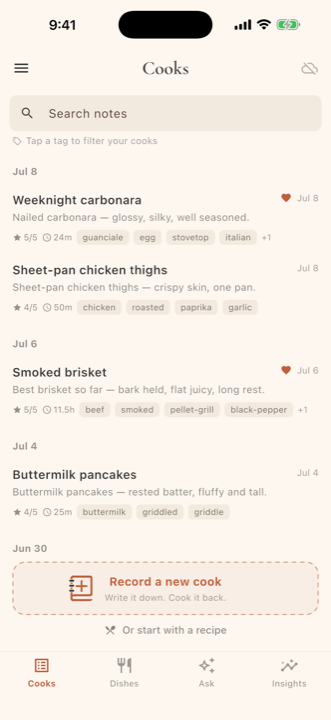
Good cooks keep notes.
Log the temperature, timing, seasoning change, or mistake you do not want to repeat. Next time, you have the full story instead of a vague memory.
There are no rigid forms to fill out. Start typing or dictating and get back to cooking. Cookback stays simple while you cook, then helps you make sense of it afterward.
How Cookback works
Write as you go, look back when you are done, and make the next one better.
Write it down
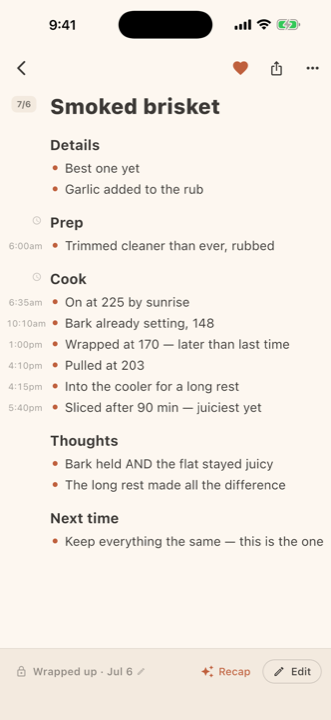
Start with a note already split into prep, cook, thoughts, and next time. Type or dictate quick updates as you go. Cookback timestamps each entry and puts it in the section you choose. You can change the template, and Cookback never rewrites your notes.
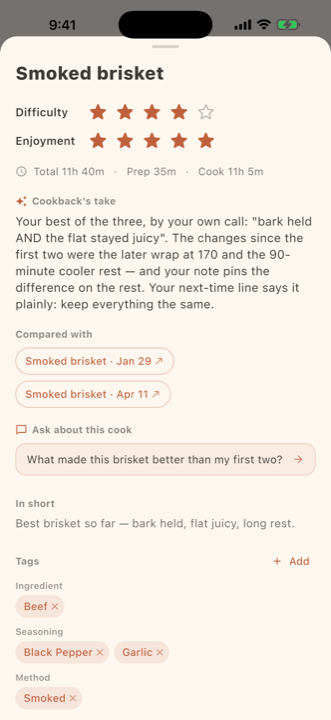
See what worked
When you are done, Cookback gives you a short recap of the cook. It calls out what changed, what seemed to help, and what you wanted to try next, using your notes and linking back to the cooks it referenced. It works like a better memory of the cook.
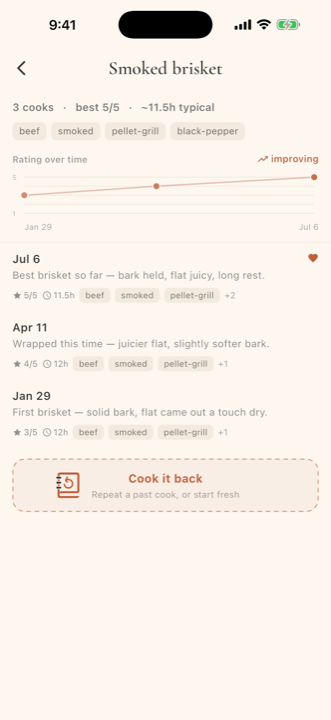
Cook it back
Each dish keeps its own history. Compare every brisket, pizza, or loaf in one place, see whether your ratings are moving up, and reuse the version you liked best. When you nail it, cook it back.
Ask
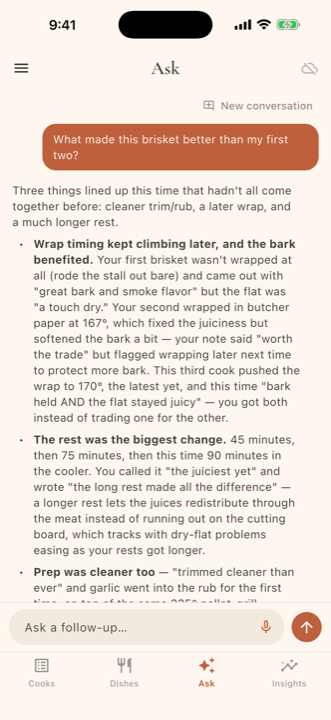
Ask your own kitchen
Ask a question across all of your cook notes. Try, "What did I change the last time this brisket turned out better?" Cookback answers from what you wrote and links back to the cooks it used.
Answers come from your journal and cite the cooks behind them.
A few other useful things
The parts that make a cooking journal easier to use over time.
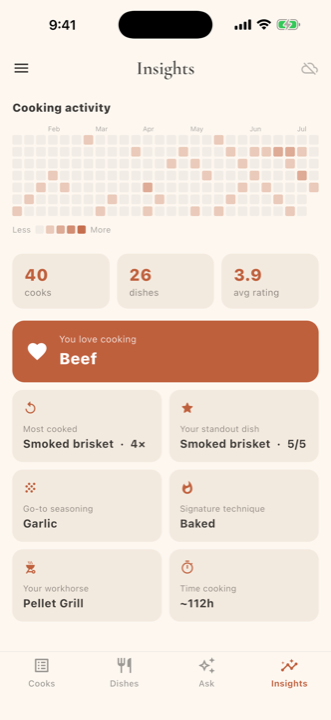
Insights
See how often you cooked, which dishes stood out, the seasonings you reach for most, and how many hours you spent at the fire.
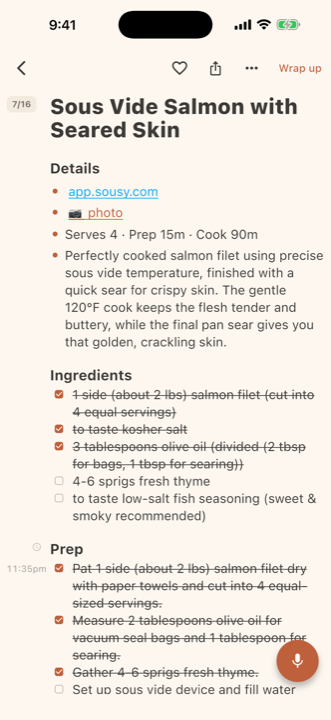
Start with a recipe
Paste a recipe link from the web, TikTok, YouTube, or Instagram. Cookback turns it into a cook note with ingredients and steps you can check off, then write over as you make it your own.
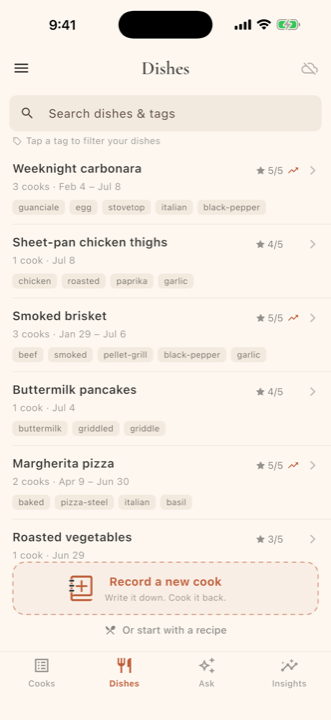
Dishes
Every cook for the same dish lives together, so your carbonaras, briskets, and sourdough attempts are easy to find and compare.
Free to keep. Pro to reflect.
Keep as many cook notes as you want for free. Pro adds the features that read, compare, and import.
Free
The full journal, always free.
- Capture cooks with photos and dictation
- Dishes, Insights, and trends over time
- Auto-tagging and full-text search
- A few recaps, Ask questions, and imports to try
Pro
$1.99/mo · or $19.99/yr
- A written recap after every cook
- Ask questions across your whole journal
- Import recipes from a link
- Auto-tagging and search remain free
Auto-renewing subscription, billed through the App Store or Google Play. Cancel anytime.
Private by design
Your cooking journal is yours. No ads, no trackers, and nothing sold.
Your journal lives on your device. The content you add to Cookback, including cook notes, dish names, tags, photos, recaps, and history, is stored locally. If you turn on cloud sync, a copy also lives in your own private cloud: your iCloud on Apple devices or a hidden app-only area of your Google Drive on Android. It does not live on our servers. This is your content. We don't receive or store your journal on our servers, except for the specific content sent when you use an AI feature.
When AI features run
When you wrap up a cook, generate a recap, ask a question, or import a recipe, Cookback sends only the note text and journal context needed to answer that request to our service, then returns the result. If a feature needs a photo, only that photo or its metadata is sent. You can avoid all of it by not using AI features.
What we never do
- We don't sell your personal information, ever.
- We don't share your cook journal with advertisers, and there are no third-party ad trackers in the app.
- We don't use your private cook notes to train our own AI models. Where a provider offers settings that limit training or retention, we aim to use them.
What we do collect
To operate and protect the service, we may keep technical information such as app version, device type, OS, approximate region, request and error logs, and crash reports. If you contact support, we keep what you send us. Purchases are handled by the app store you bought through, Apple or Google. We receive the entitlement and receipt status needed to unlock Pro and provide support, never full payment-card details.
Your choices
You can request access, deletion, or export of your information by emailing privacy@cookback.app. Deleting the app removes your local journal from that device. Depending on where you live, you may have additional rights under laws such as the CCPA, GDPR, or UK GDPR.
This is a plain-language summary of how Cookback handles data. Read the full Privacy Policy and Terms of Service (also available in the app under Settings), and reach us anytime at privacy@cookback.app.
Support & contact
Found a bug, have an idea, or wish Cookback handled a dish better?
Email us. A real person reads every message and usually replies within 1 to 3 business days.
support@cookback.app